

Download Tiny Youtube Converter – YouTube to MP3, Portable Device Compatibility, Easy Sharing
Overview
Tiny Youtube Converter is a lightweight utility designed to help users convert YouTube videos into MP3 audio files for offline listening. The app serves as a straightforward tool for individuals who want to save music or spoken content from YouTube and enjoy it on portable devices such as MP3 players, iPods, or smartphones. Its primary purpose is to eliminate the need for an internet connection during playback, enabling users to listen to their favorite tracks anytime, anywhere. This functionality is especially valuable for commuters, travelers, or anyone seeking uninterrupted access to audio content.
The target audience includes music lovers, podcast listeners, language learners, and content enthusiasts who frequently engage with YouTube audio material. By transforming video content into a standard audio format, the app supports a broader range of playback devices, enhancing accessibility. Although the developer did not provide additional background information, the app’s name and functionality suggest a focused, niche utility rather than a large-scale multimedia platform.
Real-world use cases include saving educational lectures, music tracks, or audiobooks from YouTube for offline consumption. In the broader app ecosystem, Tiny Youtube Converter fills a gap for users who prefer simple, no-frills tools over complex media management platforms. It offers a direct solution to a common user need: extracting audio from YouTube without relying on third-party websites or browser extensions.
Key Features & Functionality
- Effortless YouTube to MP3 Conversion: The app allows users to input a YouTube URL and convert the video into an MP3 file in seconds. This streamlined process is ideal for users who want quick access to audio content without navigating through multiple steps or installing additional software.
- Compatibility with Portable Devices: Converted MP3 files are optimized for playback on popular devices such as iPods, MP3 players, and smartphone music players. This ensures that users can transfer and enjoy their saved content across different platforms without format issues.
- User-Friendly Interface: The software features a clean, intuitive layout with minimal navigation complexity. Even users with limited technical experience can operate the app with ease, making it accessible to a wide audience.
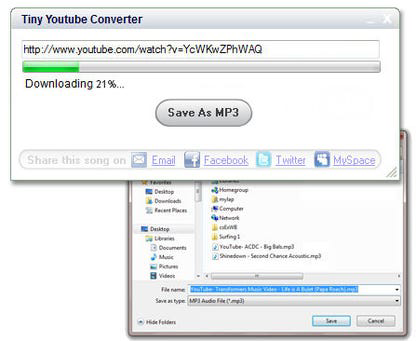
- Social Media and Email Sharing: After conversion, users can share their favorite tracks directly via social media platforms or email. This feature supports content discovery and personal sharing, enhancing the app’s utility beyond individual use.
- Local Storage Management: The app saves MP3 files directly to the user’s local device, allowing for organized storage, playlist creation, and easy retrieval. This local approach ensures privacy and independence from cloud-based services.
For example, a student might use the app to download a language tutorial from YouTube and listen to it during a commute. Similarly, a music enthusiast could convert a live performance video into MP3 for offline enjoyment. The ability to manage audio files locally also supports long-term content archiving and personal library building.
Interface, UX & Performance
Tiny Youtube Converter features a minimalist interface that prioritizes functionality over visual flair. The layout is centered around a single input field for the YouTube URL, a conversion button, and a file save location selector. This streamlined design reduces cognitive load and ensures that users can complete tasks with minimal effort. Navigation is linear and predictable, with no hidden menus or complex workflows.
Although the developer did not list formal performance metrics, the app is designed for quick processing, with conversions reportedly completed in seconds. The lightweight size of 10.5 MB suggests efficient resource usage, which may contribute to smooth performance on older or low-spec systems. Responsiveness appears to be consistent, with no reported lag during input or file saving.
Stability is a key aspect of the user experience. Since the app operates locally and does not require constant internet connectivity after the initial conversion, it maintains reliable performance across sessions. The absence of in-app advertisements or bundled software further supports a clean and stable experience. While device-specific performance variations are not disclosed, the app’s lightweight nature implies broad compatibility with standard Windows systems.
Platform Compatibility & Technical Requirements
Tiny Youtube Converter is designed for the Windows platform. The app requires no additional runtime environments or software installations, which simplifies deployment. The file size is 10.5 MB, indicating a compact and efficient application that does not consume significant system resources.
Specific operating system requirements were not listed by the developer. As such, compatibility with older or newer versions of Windows cannot be confirmed. The developer did not specify minimum OS versions, so users should exercise caution when installing on systems below Windows 7 or above Windows 11. Similarly, no hardware specifications were provided, making it impossible to assess performance on low-memory or low-CPU devices.
Despite the lack of detailed requirements, the app’s small footprint suggests it is likely to function on a wide range of Windows machines, including those with limited storage or processing power.
Pros and Cons
Pros
- Simple, intuitive interface suitable for non-technical users
- Fast and efficient conversion of YouTube videos to MP3
- Supports offline playback on portable devices like iPods and MP3 players
- Files are saved locally, ensuring privacy and full user control
- Free to download and use with no hidden costs
Cons
- Platform is limited to Windows; no support for macOS, Android, or iOS
- Developer did not disclose OS or hardware requirements
- No built-in playlist or library management features
- Conversion process relies solely on YouTube URLs; no support for other video platforms
- No automatic update notifications or version tracking
FAQ
Is Tiny Youtube Converter safe to download and use?
The app is free and does not require registration. It is distributed directly by the developer, reducing the risk of malware. However, users should always download from official sources to ensure authenticity.
Can I convert videos from platforms other than YouTube?
Based on the available information, the app is designed specifically for YouTube content. There is no indication of support for other video hosting services.
Does the app require an internet connection after installation?
Yes, an active internet connection is required to access YouTube videos and initiate the conversion process. However, once converted, the MP3 files can be played offline.
Is there a mobile version available?
The app is currently only available for Windows. There is no official mobile version for Android or iOS.
How often are updates released?
Update frequency is not disclosed. Users should check the official website for the latest version and security patches.
Final Thoughts
Tiny Youtube Converter stands out as a focused, efficient tool for users seeking to extract and save YouTube audio content in MP3 format. Its simplicity, speed, and compatibility with portable devices make it a practical choice for anyone who values offline listening. While it lacks advanced features like playlist management or cross-platform support, its core functionality is executed well and reliably.
For music fans, podcast listeners, and students, the app offers a secure, free, and straightforward way to build a personal audio library. The absence of ads, subscriptions, or data collection enhances its appeal as a privacy-conscious utility. Although it is limited to Windows and does not support mobile devices, its lightweight design ensures it runs smoothly on most standard systems.
Download Tiny Youtube Converter now


